Advanced
Full Agent + Streamlit (LangGraph)
Production-ready Streamlit application with LangGraph state machines, RAG, moderation layers, guardrails, and explicit control flow.
Why LangGraph?
State Machines
Explicit control flow with nodes and edges
Cycles & Loops
Support for iterative agent behaviors
Conditional Branching
Dynamic routing based on state
Full Observability
Track state at every step of execution
LangChain (AgentExecutor)
- Implicit control flow
- Tool calling in a loop
- Simpler to get started
- Less granular control
LangGraph (StateGraph)
- Explicit state machine
- Custom node transitions
- More complex but powerful
- Full control over execution
LangGraph Architecture
Step 1: Environment Setup
Recommended: Docker ensures consistent environment and
includes all dependencies.
# 1. Make sure Ollama is running
ollama serve
ollama pull llama3.1

# 2. Navigate to the directory
cd "Full Agent + streamlit + langgraph"

# 3. Run with helper script (recommended)
chmod +x scripts/docker-run.sh
./scripts/docker-run.sh run

# OR use docker-compose directly
docker-compose up --build

# 4. Access the app
# Open: http://localhost:8505
Automated: Use the provided PowerShell script to install
dependencies.
1. Setup & Environment
# 1. Navigate to the project
cd "Full Agent + streamlit + langgraph"

# 2. Run the automated installer (PowerShell as Admin)
.\setup\windows\install.ps1

# 3. Setup Python environment & dependencies
python -m venv .venv
.\.venv\Scripts\activate
pip install -r requirements.txt
2. RAG System (FAISS + Embeddings)
Important: You must initialize the vector database to enable
RAG features.
# Generate the FAISS index from PDFs
python src/rag/generate_vector_db.py
Note: If you have an NVIDIA GPU, run
.\setup\windows\fix_pytorch_cuda.bat after setup for acceleration.
Automated: Use the shell script to install Homebrew
dependencies.
# 1. Installation & Setup
cd "Full Agent + streamlit + langgraph"
chmod +x setup/mac/install.sh && ./setup/mac/install.sh

# 2. Python environment & dependencies
python3 -m venv .venv && source .venv/bin/activate
pip install -r requirements.txt
2. RAG System (FAISS + Embeddings)
Important: You must initialize the vector database to enable
RAG features.
# Generate the FAISS index from PDFs
python src/rag/generate_vector_db.py
AI-Assisted: Use GitHub Copilot or any AI coding assistant to
automate installation.
How to Use
The project includes a ready-to-use prompt file that you can copy and paste into Copilot, ChatGPT, Claude, or any AI assistant.
Open
COPILOT_INSTALL_PROMPT.md in the project root
Copy the content inside the code block
Paste into your AI assistant (Copilot, ChatGPT, etc.)
Follow the AI-generated step-by-step instructions
What the Prompt Includes
- System requirements (Python, Ollama, Graphviz)
- Key Python packages from requirements.txt
- Step-by-step installation for Windows and macOS
- Complete project structure reference
- Troubleshooting common issues
- Quick commands summary table
# Location of the Copilot prompt file:
COPILOT_INSTALL_PROMPT.md

# The file contains a detailed prompt you can use with:
# - GitHub Copilot Chat
# - ChatGPT / GPT-4
# - Claude
# - Any AI coding assistant

# Simply copy the prompt and paste it into your AI tool!
Step 2: RAG System
FAISS + PDF processing + Embeddings
Important: You must initialize the vector database to enable RAG
features.
# Generate the FAISS index from PDFs
python src/rag/generate_vector_db.py
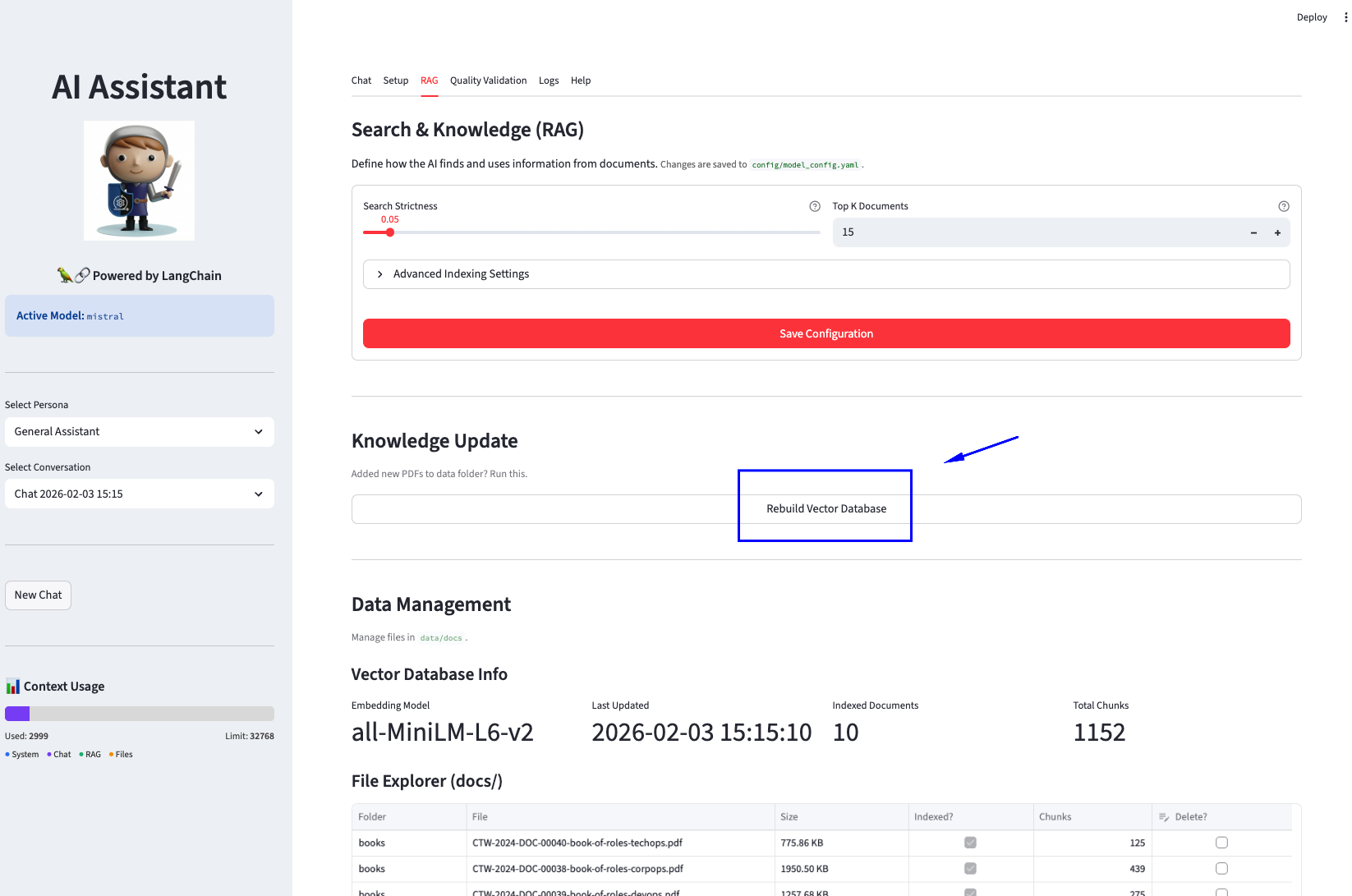
Pro Tip: After running the app, you can also go to the
"RAG" tab in the interface and click "Rebuild Vector Database" to refresh
your knowledge base without using the command line.
Nodes: Functions that process state
Edges: Transitions between nodes
State: Shared data across nodes
Router: Conditional branching
# src/agent/graph.py
from langgraph.graph import StateGraph, END
from typing import TypedDict, Annotated

class AgentState(TypedDict):
    messages: Annotated[list, add_messages]
    tool_calls: list
    final_response: str

def create_agent_graph():
    graph = StateGraph(AgentState)

    # Add nodes
    graph.add_node("agent", agent_node)
    graph.add_node("tools", tool_node)

    # Add edges
    graph.set_entry_point("agent")
    graph.add_conditional_edges(
        "agent",
        router,
        {"tools": "tools", "end": END}
    )
    graph.add_edge("tools", "agent")  # Cycle back

    return graph.compile()
Toxicity: Filters offensive language
Injection: Blocks prompt attacks
PII Masking: Redacts emails/phones
DLP: Prevents data leakage
# src/moderation/manager.py
class ModerationManager:
    def check_input(self, text: str) -> ModerationResult:
        if self._is_toxic(text):
            return ModerationResult(blocked=True, reason="Toxic content")
        if self._is_injection(text):
            return ModerationResult(blocked=True, reason="Injection attempt")
return ModerationResult(blocked=False, cleaned=self._mask_pii(text))Chat Tab
Conversational interface with tools
Setup Tab
LLM, RAG, and persistence config
Help Tab
Documentation and examples
Project Structure
Full Agent + streamlit + langgraph/
├── ui.py                    # Main Streamlit interface
├── config/                  # YAML configurations
│   ├── model_config.yaml    # LLM settings
│   └── prompt_templates.yaml
├── src/
│   ├── agent/               # LangGraph Agent
│   │   ├── graph.py         # StateGraph definition
│   │   ├── nodes.py         # Node functions
│   │   └── state.py         # State schema
│   ├── moderation/          # Security Layer
│   │   └── manager.py       # Toxicity, injection, PII
│   ├── guardrails/          # Quality Layer
│   │   └── validators.py    # Citations, tone
│   ├── rag/                 # RAG Implementation
│   │   ├── retriever.py
│   │   └── generate_vector_db.py
│   ├── tools/               # Agent tools
│   └── llm/                 # LLM clients
└── data/
    ├── docs/books/          # PDF documents
    └── embeddings/          # FAISS index