🔌 Connecting MCP Server to Claude Desktop
📦 Download Workshop Files
Download the complete MCP + Claude Desktop workshop package with all code files, Docker setup, and sample PDF.
⬇️ Download ZIP PackageThis hands-on workshop guides you through setting up a Model Context Protocol (MCP) server locally and connecting it to the Claude Desktop application for vector database searches.
📋 Table of Contents
- Prerequisites
- Project Structure
- Step 1: Installation
- Step 2: Generate Vector Database
- Step 3: Configure Claude Desktop
- Step 4: Test the Connection
- Using the Tools
- Troubleshooting
🔧 Prerequisites
- macOS, Linux, or Windows
- Python 3.10+ installed
- Claude Desktop App installed (Download here)
- Virtual environment (recommended)
📁 Project Structure
MCP + Claude Desktop/
├── mcp_vector_server.py    # Main MCP server
├── generate_vector_db.py   # Script to generate FAISS index from PDFs
├── search_vector_db.py     # Standalone search script
├── client_vector.py        # Test client
├── requirements.txt        # Python dependencies
├── data/                   # All data files
│   ├── PDF/                # Place your PDF files here
│   │   └── *.pdf           # Will be processed automatically
│   ├── knowledge_base.json # Extracted text (auto-generated)
│   └── faiss_index/        # Generated FAISS index
│       ├── faiss.index
│       ├── texts.json
│       └── embeddings.npy
⚙️ Step 1: Installation
1Navigate to Project Directory
cd /path/to/your/project/MCP\ +\ Claude\ Desktop2Create and Activate Virtual Environment
# Create virtual environment
python3 -m venv .venv

# Activate (macOS/Linux)
source .venv/bin/activate

# Activate (Windows)
.venv\Scripts\activate3Install Dependencies
pip install -r requirements.txtContents of requirements.txt:
mcp>=0.1.0
fastmcp>=0.1.0
faiss-cpu>=1.7.4
sentence-transformers>=2.2.0
numpy>=1.24.0
PyPDF2>=3.0.0
🗄️ Step 2: Generate Vector Database
1Add Your PDF Files
Place your PDF documents in the data/PDF/ folder:
# Create the folder structure if needed
mkdir -p data/PDF

# Copy your PDFs to the folder
cp /path/to/your/documents/*.pdf data/PDF/
Expected structure:
data/PDF/
├── document1.pdf
├── document2.pdf
└── ...2Generate the Index
python generate_vector_db.py✅ Expected Output
============================================================
🚀 FAISS Vector DB Generator from PDFs
============================================================
📂 Found 1 PDF file(s) in: /path/to/data/PDF
📄 Processing: CTW-2019-PCS-00043-book-of-delivery.pdf
   ✓ Extracted 27 chunks

💾 Knowledge base saved to: data/knowledge_base.json

📚 27 knowledge chunks to index.
⚙️ Generating embeddings with model: all-MiniLM-L6-v2

✅ FAISS vector DB created successfully!
📁 Location: data/faiss_index
📦 Entries: 27 | Dimensions: 384
============================================================
🖥️ Step 3: Configure Claude Desktop
1Locate the Configuration File
2Edit the Configuration
Open the file (create it if it doesn't exist) and add the MCP server configuration:
{
  "mcpServers": {
    "vector-db": {
      "command": "/ABSOLUTE/PATH/TO/.venv/bin/python3",
      "args": ["/ABSOLUTE/PATH/TO/MCP/mcp_vector_server.py"],
      "env": {
        "PYTHONPATH": "/ABSOLUTE/PATH/TO/MCP"
      }
    }
  }
}
⚠️ IMPORTANT: Use Absolute Paths!
Replace the paths with your actual absolute paths. Relative paths (like ./ or
~/) may not work correctly.
Example Configuration (macOS)
{
  "mcpServers": {
    "vector-db": {
      "command": "/Users/youruser/project/.venv/bin/python3",
      "args": ["/Users/youruser/project/MCP + Claude Desktop/mcp_vector_server.py"],
      "env": {
        "PYTHONPATH": "/Users/youruser/project/MCP + Claude Desktop"
      }
    }
  }
}
Finding Your Absolute Paths
# Find Python path
which python3

# Find current directory
pwd3Restart Claude Desktop
⚡ CRITICAL: Complete Restart Required
After editing the configuration, you MUST completely restart Claude Desktop:
- Close Claude Desktop completely (Cmd+Q on macOS)
- Open Claude Desktop again
- The MCP server will load automatically
✅ Step 4: Test the Connection
Test via Python Client (Local)
python client_vector.py mcp_vector_server.py✅ Expected Output
🔌 Starting MCP client for server: mcp_vector_server.py
✅ MCP Handshake Complete
🛠 Tools detected: ['create_vector_db', 'search_vector_db']
📌 RAW RESPONSE FROM SERVER:
1) score=0.7131
Your relevant text here...
Check Claude Desktop Logs
# macOS
cat ~/Library/Logs/Claude/mcp-server-vector-db.log
Look for these messages:
[SERVER_LOG] Server loading...
[SERVER_LOG] Loading SentenceTransformer model...
[SERVER_LOG] Model loaded successfully!
[SERVER_LOG] Starting MCP server...
🔍 Using the Tools in Claude Desktop
⭐ NEW: Simplified Search Tool!
The server now includes a search tool that uses default paths automatically. No need to
specify file paths anymore!
Tool 1: search (Recommended ⭐)
Simple semantic search with no paths required. Uses the default knowledge base automatically.
How to Use
In Claude Desktop, just ask naturally:
Search for "quality principles" in the knowledge base

or simply:

search delivery process| Parameter | Type | Description |
|---|---|---|
query |
string | Text to search for |
top_k |
int | Number of results (default: 5) |
Tool 2: search_vector_db
Search with optional custom path. If index_dir is not provided, uses the default location.
How to Use
In Claude Desktop, send a message like:
# Simple (uses default path):
Search "quality principles" using search_vector_db

# With custom path:
Search "quality principles" using search_vector_db with
index_dir='/ABSOLUTE/PATH/TO/data/faiss_index'| Parameter | Type | Description |
|---|---|---|
query |
string | Text to search for |
index_dir |
string (optional) | Path to FAISS index (uses default if empty) |
top_k |
int | Number of results (default: 5) |
Example in Claude Desktop
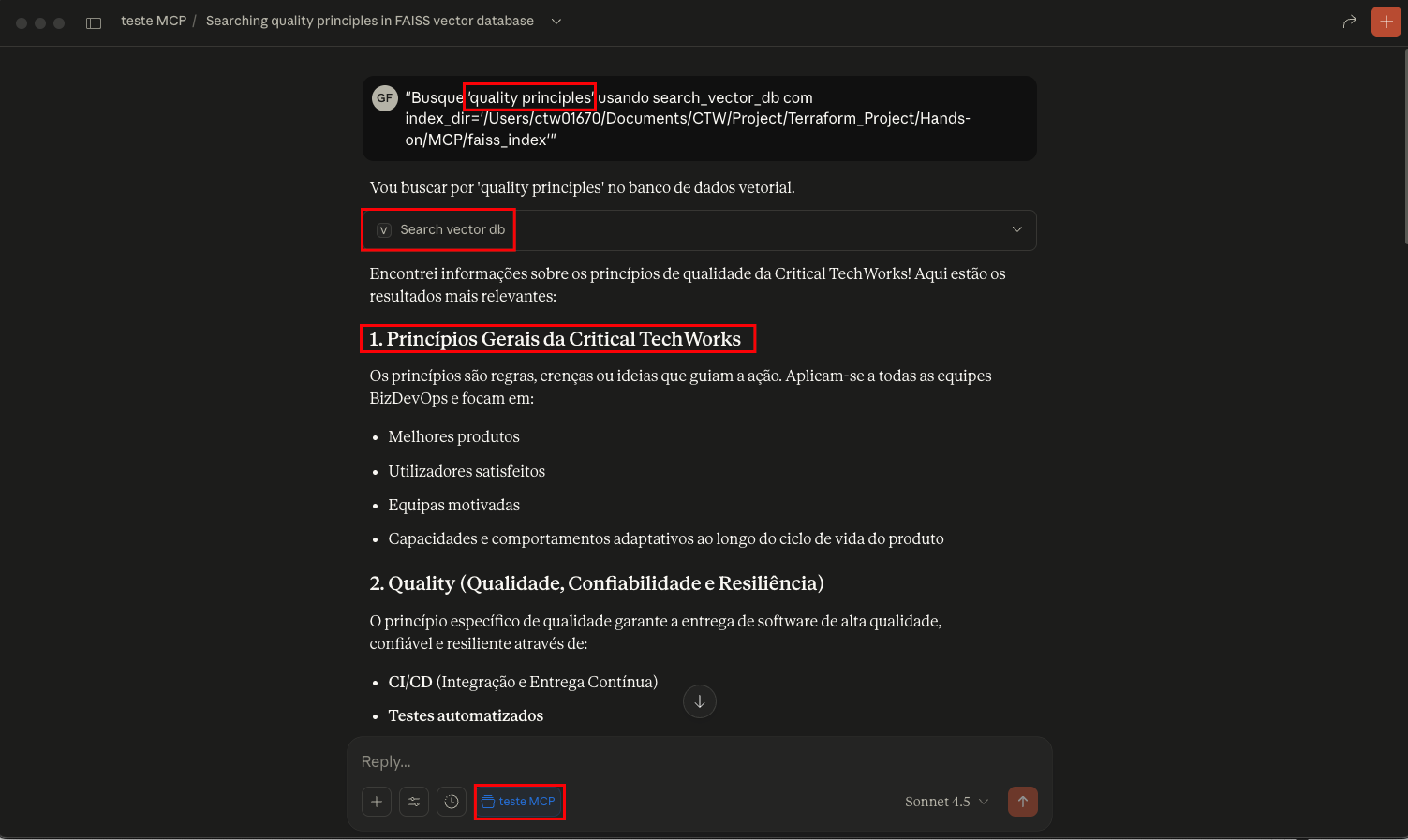
Example of searching for "quality principles" in Claude Desktop using the MCP vector database tool
Tool 3: create_vector_db
Creates a new vector database from a JSON file.
How to Use
Create a vector database from '/path/to/knowledge.json'
in the directory '/path/to/output'| Parameter | Type | Description |
|---|---|---|
json_path |
string | Path to the JSON file with texts |
output_dir |
string | Directory where to save the index |
🛠️ Troubleshooting
Problem: "No result received from client-side tool execution"
Possible Causes:
- MCP server is not running
- Incorrect
index_dirpath - Server error (check logs)
Solution:
- Check logs:
cat ~/Library/Logs/Claude/mcp-server-vector-db.log - Restart Claude Desktop
- Use complete absolute paths
Problem: "BrokenPipeError"
Cause: Claude Desktop closed the connection before the server responded.
Solution: Ensure you're using the latest version of mcp_vector_server.py which
handles this error gracefully.
Problem: Server or Tools Not Appearing
Solutions:
- Verify Python path is correct:
which python3 # Use this path in config - Verify script path is correct:
ls -la /your/path/mcp_vector_server.py - Restart Claude Desktop completely (Cmd+Q and reopen)
Problem: "faiss.index missing" or "texts.json missing"
Cause: The FAISS index was not generated or the path is incorrect.
Solution:
- Generate the index:
python generate_vector_db.py - Verify files exist:
ls -la faiss_index/ - Use the correct absolute path in Claude Desktop
📊 Monitoring Logs
For advanced debugging, monitor logs in real-time:
# Specific vector-db log
tail -f ~/Library/Logs/Claude/mcp-server-vector-db.log

# All MCP logs
tail -f ~/Library/Logs/Claude/mcp.log
📝 Complete Example
1. Project Structure
/Users/youruser/project/
├── .venv/
│   └── bin/python3
└── MCP + Claude Desktop/
    ├── mcp_vector_server.py
    └── data/
        ├── PDF/
        │   └── your-documents.pdf
        ├── knowledge_base.json
        └── faiss_index/
            ├── faiss.index
            ├── texts.json
            └── embeddings.npy
2. Claude Desktop Configuration
{
  "mcpServers": {
    "vector-db": {
      "command": "/Users/youruser/project/.venv/bin/python3",
      "args": ["/Users/youruser/project/MCP + Claude Desktop/mcp_vector_server.py"],
      "env": {
        "PYTHONPATH": "/Users/youruser/project/MCP + Claude Desktop"
      }
    }
  }
}
3. Prompt in Claude Desktop
Search "quality principles" using search_vector_db with
index_dir='/Users/youruser/project/MCP + Claude Desktop/data/faiss_index' and top_k=3
4. Expected Result
1) score=0.5410
[Source: CTW-2019-PCS-00043-book-of-delivery.pdf]
Critical TechWorks Principles...

2) score=0.4262
[Source: CTW-2019-PCS-00043-book-of-delivery.pdf]
Critical TechWorks Quality...

3) score=0.2408
[Source: CTW-2019-PCS-00043-book-of-delivery.pdf]
Critical TechWorks Visibility...
🔗 References
← Back to Hands-on Workshops