Live Session

GenAI Workshop

Advanced AI systems, embeddings, RAG pipelines, agents, and modern frameworks. Understanding the fundamentals of Generative AI and how to apply them in real-world scenarios.

LLM Embeddings RAG Tokens Context Window LangChain LangGraph Guardrails Hallucinations MCP Agents

Agenda

Workshop Flow

📅 Timeline

09:15
Introduction (10 min)
09:25
Share Knowledge about GenAI (~1h15)
09:25
GenAI Foundations (20 min)
Data Engineer vs GenAI • Tokens • Embeddings • Context Window
09:45
RAG Overview (10 min)
09:55
Safety & Reliability (10 min)
10:05
Architecture & Orchestration (20 min)
10:25
Practical Use Case (15 min)
10:40
Interactive Quiz (15 minutes)
10:55
Questions and Discussion (10 minutes)
11:05
Coffee Break ☕ (15 minutes)
11:20
Hands-on Session (1h30)
Environment setup (Docker/Python)
Ollama configuration with llama3.1
Build the Onboarding Assistant with RAG
📦 Two Templates Available:
🔗 LangChain — Linear chain orchestration with agents & tools
🔄 LangGraph — Cyclic supervisor graph with multi-step reasoning
12:50
Workshop End

Total Duration: 3 hours 30 minutes (9:00 - 12:30)

Topics Covered

We'll explore the essential concepts behind modern GenAI systems, including LLMs, embeddings, RAG, tokens, context windows, agents, and frameworks like MCP and LangChain.

Must Know GenAI Terms

LLM (Large Language Model)

Advanced AI systems trained on vast text datasets to understand and generate human-like text.

Embeddings

Numerical representations of text, images, or data in high-dimensional space for semantic search, similarity comparison, and efficient AI processing.

RAG (Retrieval Augmented Generation)

Technique combining information retrieval with text generation to produce accurate, factual responses by accessing external data sources.

Tokens

Fundamental text units in AI models (words, subwords, or characters) that determine model capacity and processing limitations.

Context Window

The maximum amount of text an AI model can process at once, affecting coherence and reference to previous information.

Agents

Intelligent systems that autonomously perform tasks or make decisions using tools, memory, and advanced reasoning to achieve specific goals.

MCP (Model Context Protocol)

A standardized protocol for AI models to access external tools and data sources, improving interoperability across different models and platforms.

LangChain

An open-source framework that simplifies building applications powered by large language models, providing standardized interfaces for chains, agents, memory, and tool integrations.

Data Engineer vs GenAI

Comparing Traditional Data Engineering and GenAI

Understanding how traditional data engineering practices intersect with GenAI workflows is crucial for building robust, scalable AI systems.
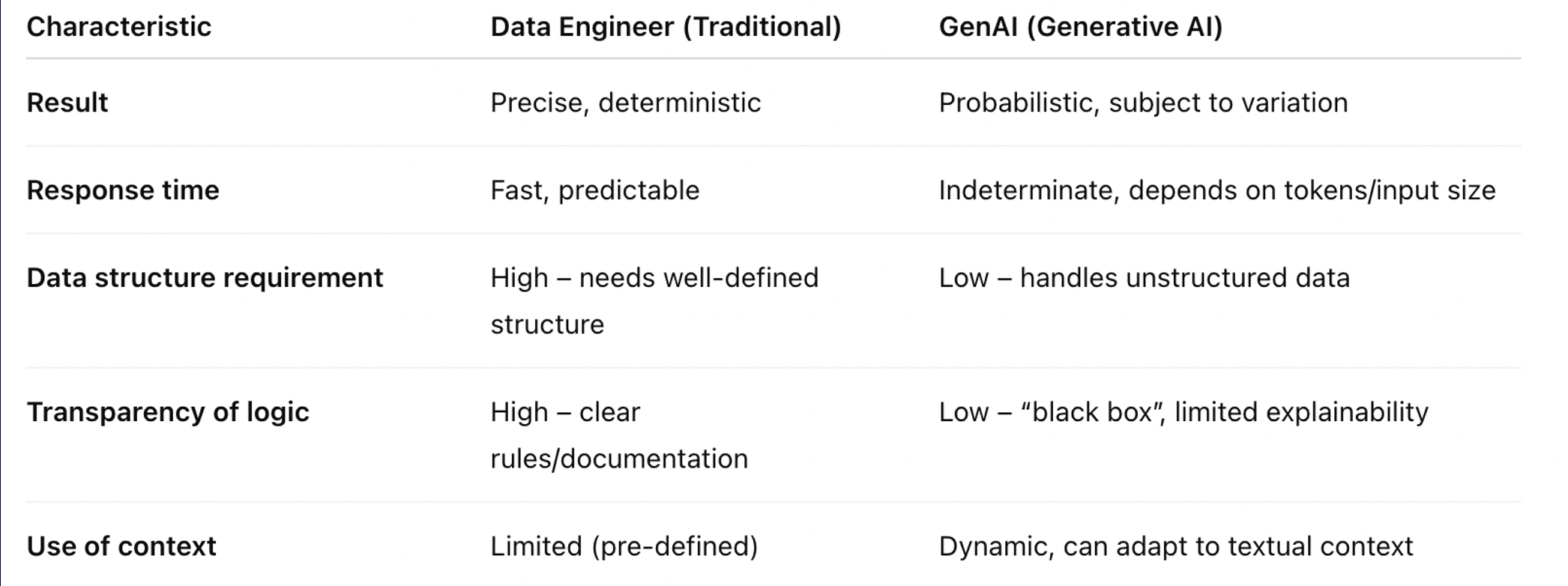
Data Engineer vs GenAI
Comparing traditional data engineering with GenAI workflows

Key Considerations

  • Data pipelines for RAG systems
  • Vector database management and optimization
  • Embedding generation at scale
  • Real-time vs batch processing for AI workloads
  • Monitoring and observability for AI systems

Introduction to GenAI

Watch: Understanding Generative AI

Before we dive into the technical details, watch this introduction to understand the fundamentals of Generative AI and its transformative potential.

Tokens

What is a Token?

A token can be a whole word, two or more words, part of a word, or even punctuation, depending on how the text is split. Tokens are the fundamental units that language models use to process and understand text.

The way text is tokenized directly impacts how the model interprets and generates language. Understanding tokens is crucial for optimizing AI interactions and managing costs.
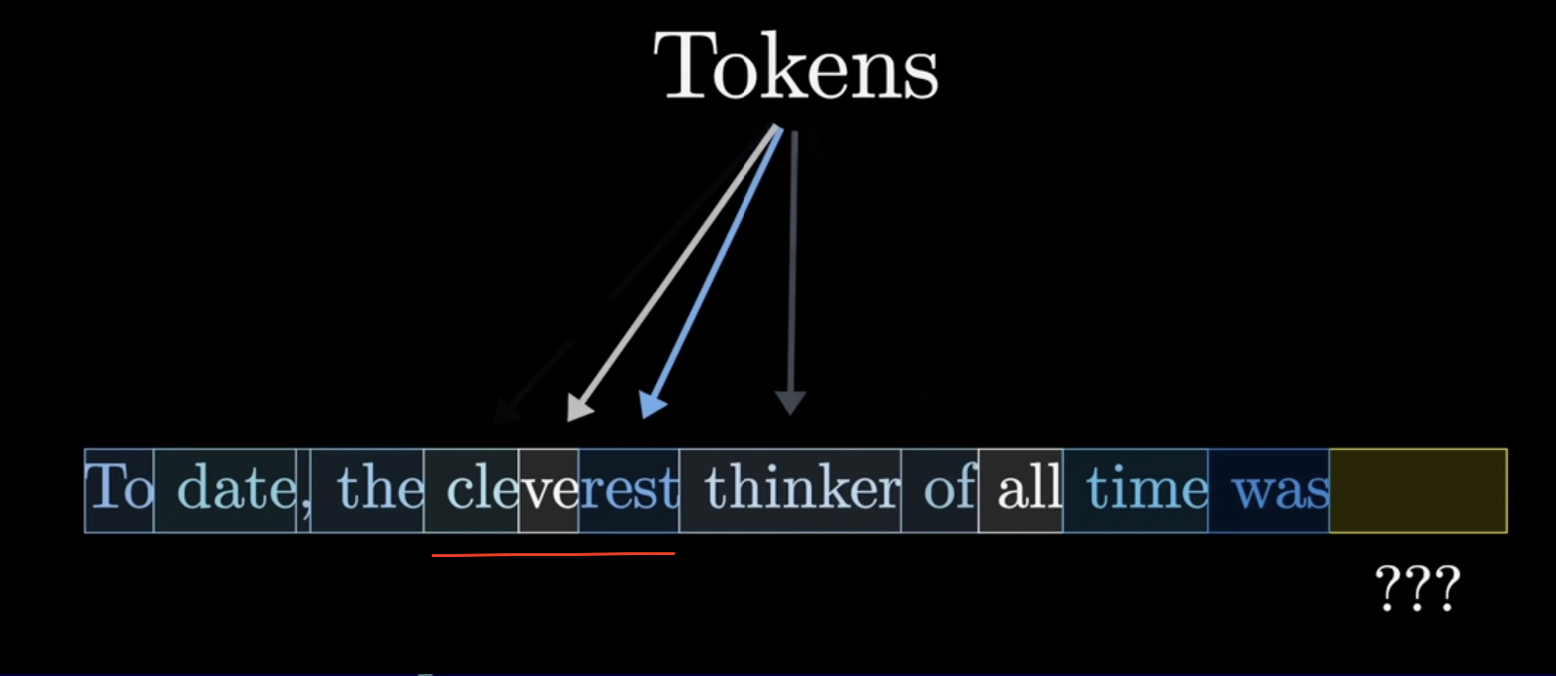
Tokens Visualization
How text is broken down into tokens for processing

Why Tokens Matter

  • Model Capacity: Determine processing limits and context window size
  • Cost Management: API calls are charged per token (input + output)
  • Response Quality: Influence the quality and coherence of model responses

Tokenization Examples

Example 1: The sentence "Hello, world!" might be tokenized as:

  • "Hello" → 1 token
  • "," → 1 token
  • " world" → 1 token (note the space)
  • "!" → 1 token
  • Total: 4 tokens

Example 2: Complex words are often split:

  • "unbelievable" might become: "un" + "believ" + "able" = 3 tokens
  • "ChatGPT" might become: "Chat" + "G" + "PT" = 3 tokens

Token Counting Rules

As a general rule of thumb:

  • 1 token ≈ 4 characters in English
  • 1 token ≈ ¾ of a word
  • 100 tokens ≈ 75 words
  • 1,000 tokens ≈ 750 words

Best Practices

  • Monitor Token Usage: Track input and output tokens to manage costs
  • Optimize Prompts: Be concise while maintaining clarity
  • Consider Context Limits: Stay within model's token limits (e.g., 4K, 8K, 128K)
  • Use Tokenizers: Tools like tiktoken help count tokens before sending requests

Different Languages

Tokenization varies significantly across languages. English typically uses fewer tokens than languages like Chinese, Japanese, or Arabic for the same semantic content. This affects:

  • Processing efficiency
  • Cost per request
  • Effective context window size

Embeddings

What are Embeddings?

Embeddings are numerical representations of tokens that capture their meaning so a model can understand relationships between words.

Embeddings are a fundamental concept in deep learning. They transform words or other data into vectors, which are numerical representations that machines can understand and process. By converting all input data into vectors, deep learning models can analyze and learn from complex information efficiently.
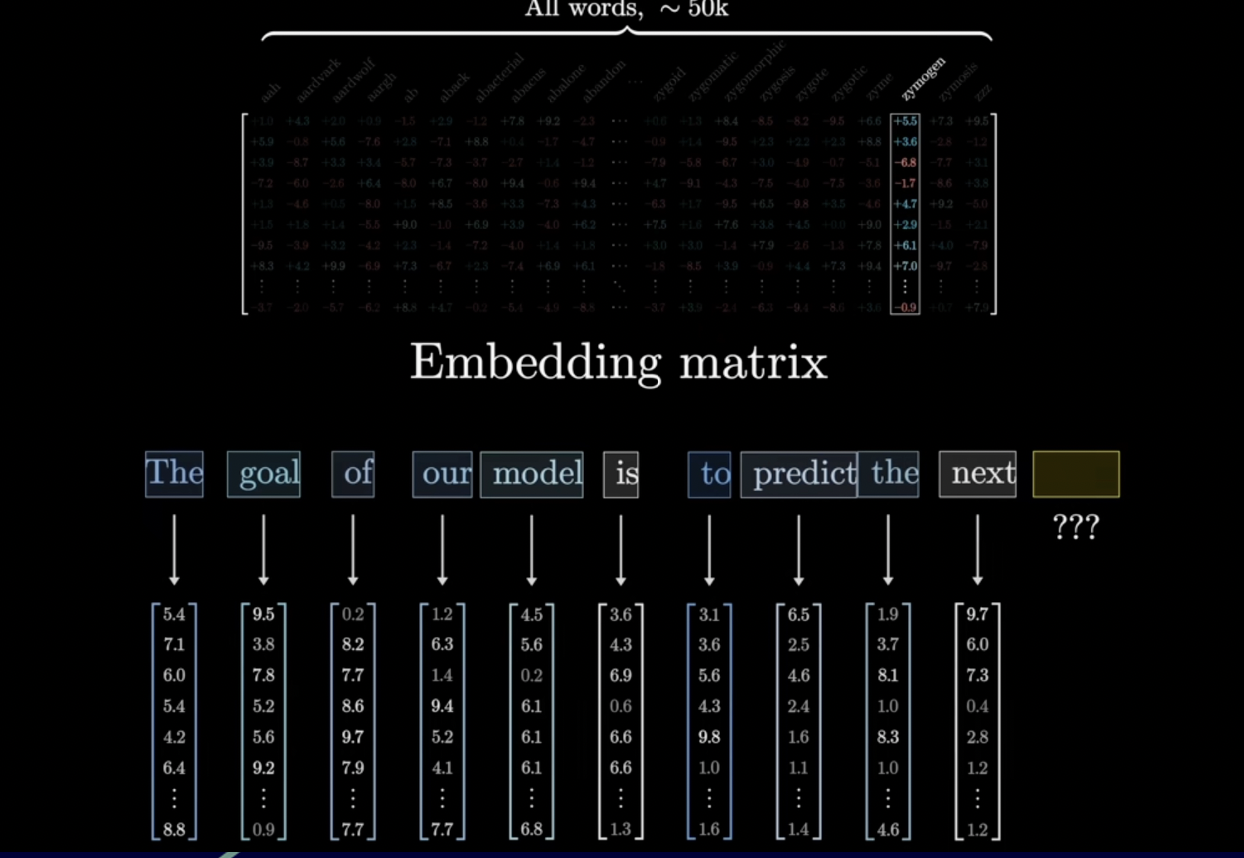
Embeddings Visualization
Visual representation of how embeddings work in multi-dimensional space

Semantic Similarity

AI models represent words as vectors in a multi-dimensional space. Here, "tower" is mapped to a point, and the model finds the closest points—words with similar meanings like "towers," "gate," "building," and "skyscraper."

This allows AI to understand relationships and similarities between words, enabling more accurate language understanding.
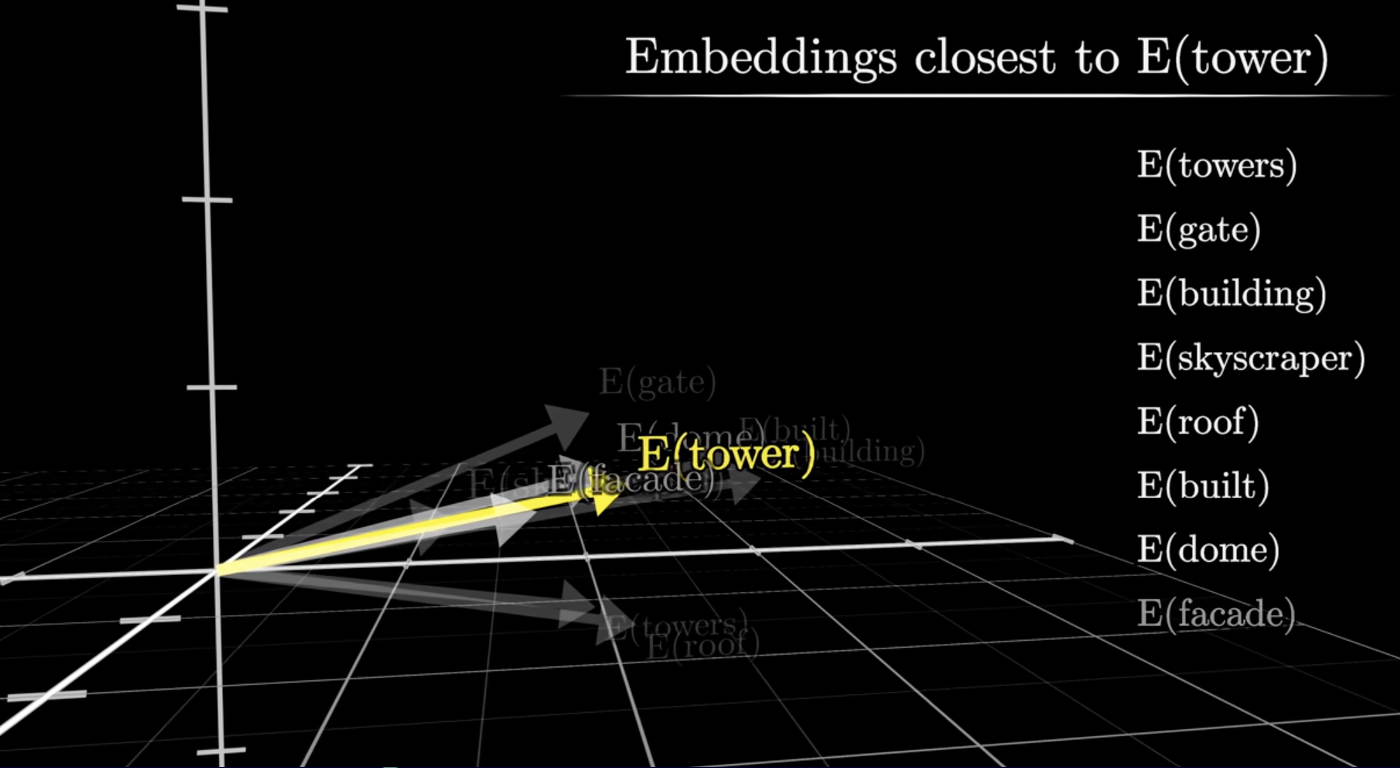
Closest Embeddings
Finding semantically similar words using vector distance

Vector Arithmetic

king - man + woman ≈ queen

By calculating the distance between "man" and "woman," we can apply the same difference to "king" and discover "queen." This powerful property allows AI models to solve word analogies using vector arithmetic, enabling a deeper understanding of the relationships and structure within language.
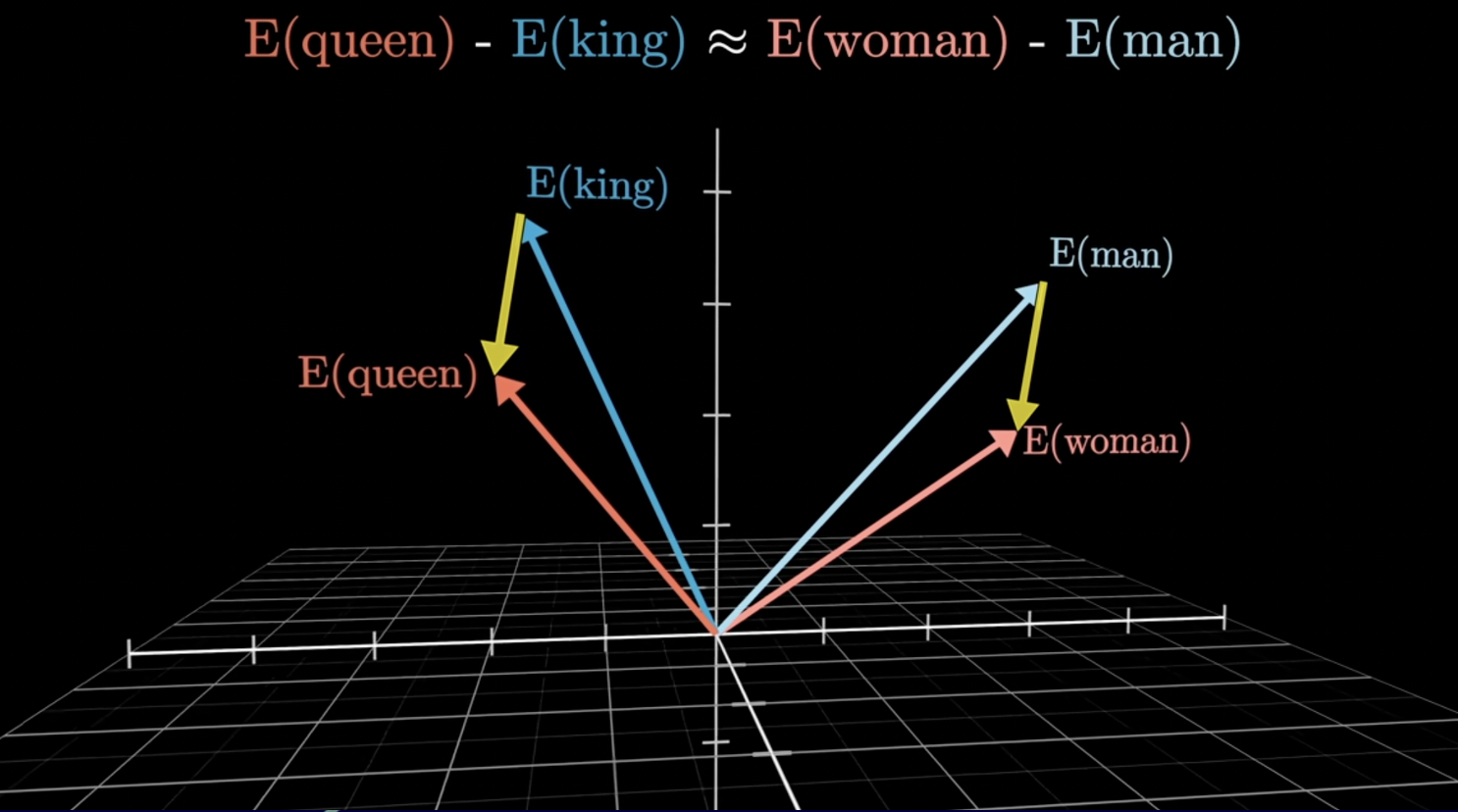
Vector Arithmetic
Vector arithmetic: king - man + woman ≈ queen

How Embeddings Work

Embeddings convert discrete data (like words or tokens) into continuous vector representations. Each dimension in the vector captures different semantic properties:

  • Dimension 1: Might capture gender (masculine ↔ feminine)
  • Dimension 2: Might capture royalty (commoner ↔ royalty)
  • Dimension 3: Might capture animacy (inanimate ↔ animate)
  • And so on... Hundreds or thousands of dimensions capture nuanced meanings

Common Embedding Models

  • Word2Vec: 300 dimensions, trained on Google News corpus
  • GloVe: 50-300 dimensions, trained on Wikipedia and web data
  • BERT: 768 dimensions, contextual embeddings
  • Sentence-BERT: 384-768 dimensions, optimized for sentences
  • OpenAI Ada-002: 1536 dimensions, state-of-the-art performance

Distance Metrics

To measure similarity between embeddings, we use:

  • Cosine Similarity: Measures angle between vectors (most common)
  • Euclidean Distance: Straight-line distance in vector space
  • Dot Product: Combines magnitude and direction

Use Cases

  • Semantic Search: Find documents similar in meaning, not just keywords
  • Recommendation Systems: Suggest similar items based on embeddings
  • Clustering: Group similar items automatically
  • Classification: Categorize text based on semantic content
  • Translation: Map words across languages in shared embedding space

Best Practices

  • Choose the Right Model: Match embedding dimensions to your use case
  • Normalize Vectors: Use unit vectors for cosine similarity
  • Cache Embeddings: Pre-compute and store for frequently used text
  • Fine-tune When Needed: Domain-specific embeddings perform better

Context Window

What is a Context Window?

The "context window" refers to the amount of information a language model can consider at once while generating responses.

Input data passes through multiple layers of attention and processing (such as multilayer perceptrons) within the model. Each layer analyzes the relationships between different parts of the input, capturing context and meaning.
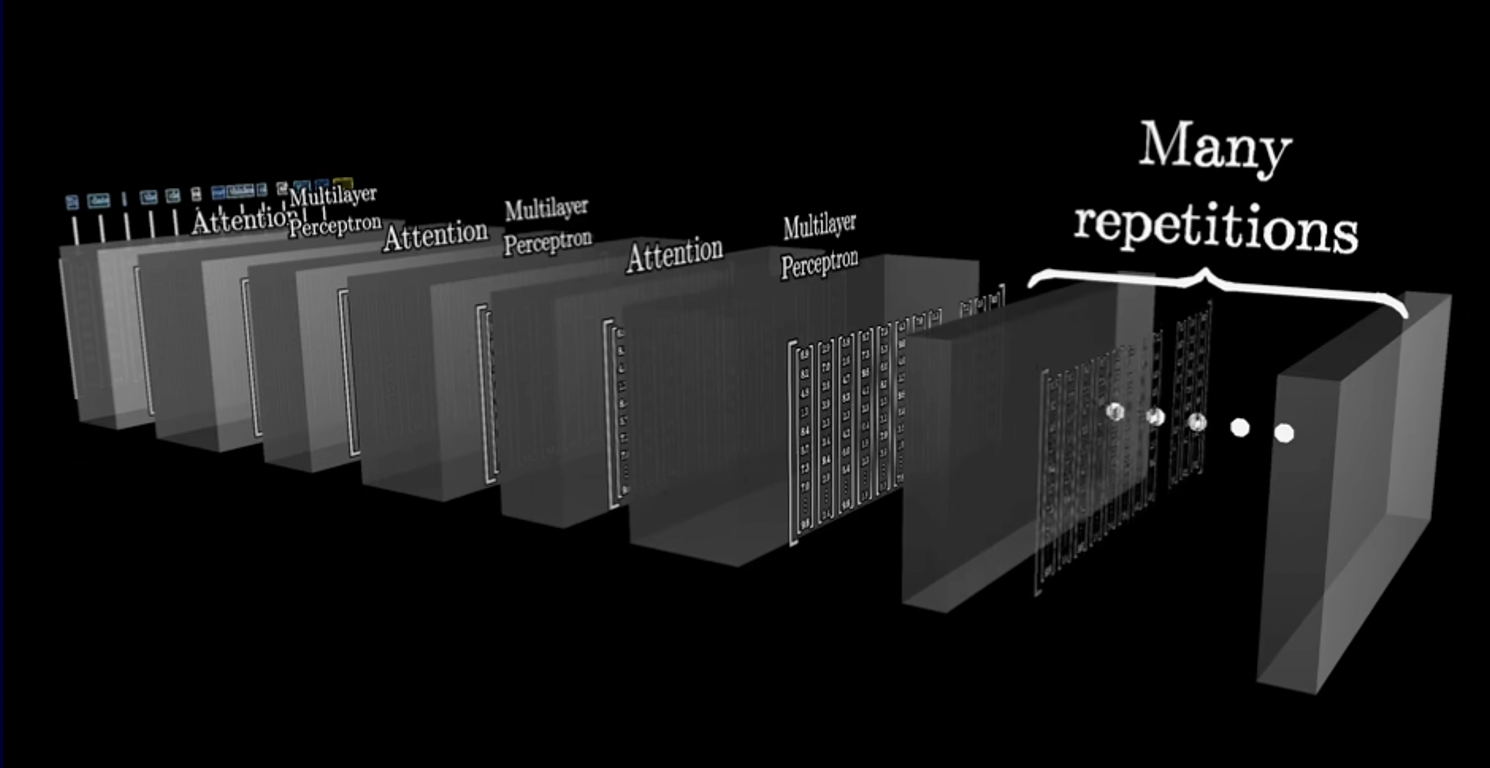
Context Window Visualization
How context flows through multiple layers of the model

Why Context Window Matters

  • Determines how much text the model can "remember" at once
  • Affects the coherence of long conversations
  • Influences the model's ability to reference previous information
  • Larger windows enable more comprehensive understanding but increase computational cost
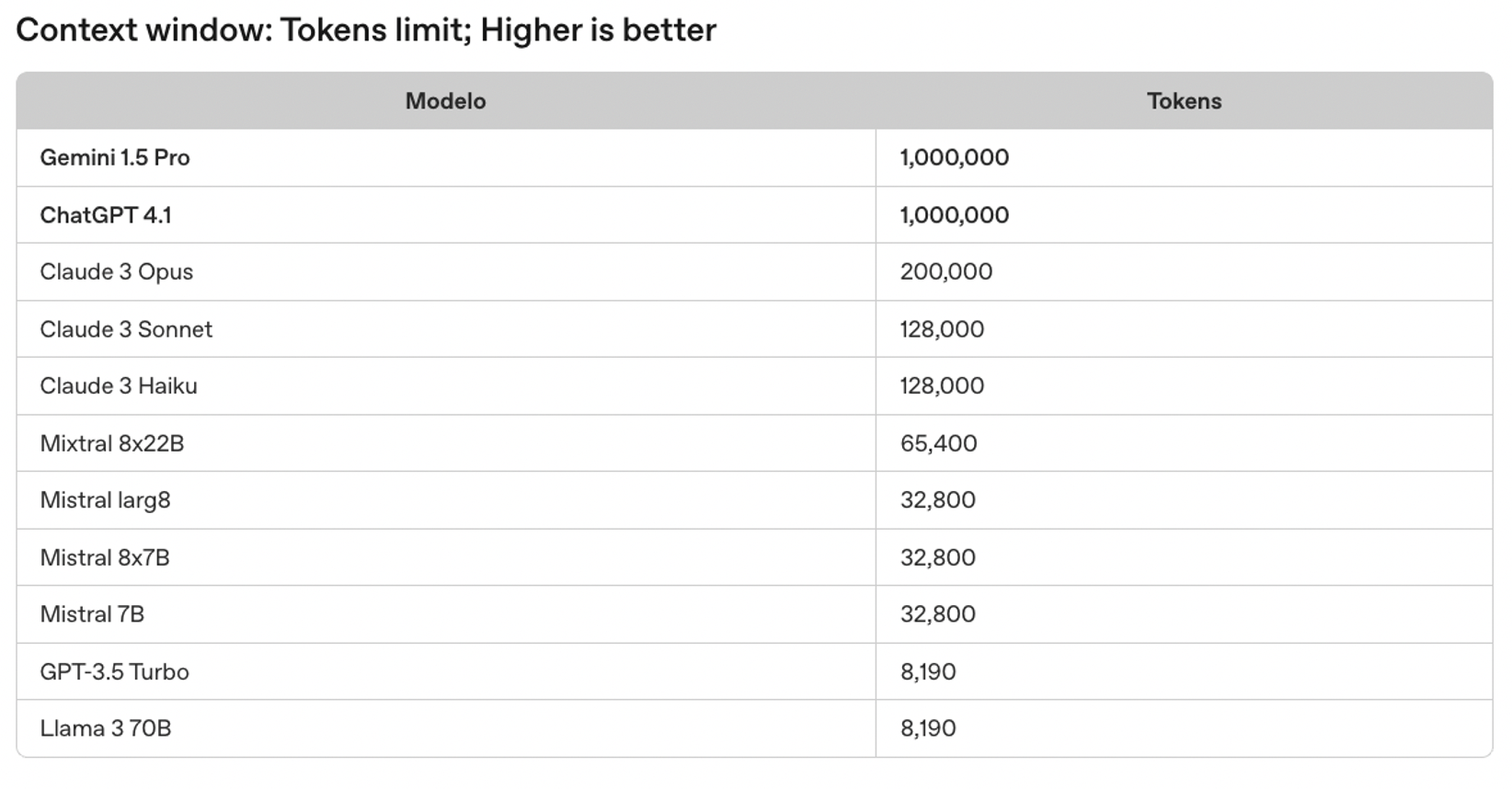
Context Window Limits
Token limits across different context window sizes

Context Window Sizes

Different models have different context window capacities:

  • GPT-3.5: 4K or 16K tokens
  • GPT-4: 8K, 32K, or 128K tokens
  • Claude 3: Up to 200K tokens (~150,000 words)
  • Gemini 1.5: Up to 1M tokens

Managing Context

Strategies for working within context limits:

  • Summarization: Condense long conversations or documents
  • Sliding Window: Keep only recent messages in context
  • RAG (Retrieval-Augmented Generation): Fetch relevant info on-demand
  • Prompt Compression: Remove unnecessary tokens while preserving meaning

Context vs. Memory

  • Context Window: What the model can "see" in a single request
  • Short-term Memory: Maintained within a conversation session
  • Long-term Memory: Stored externally (databases, vector stores)

Best Practices

  • Front-load Important Info: Put critical context early in the prompt
  • Use System Messages: Set persistent instructions outside user context
  • Monitor Token Usage: Track context consumption to avoid truncation
  • Implement Memory Systems: Store and retrieve relevant past information

RAG: Retrieval Augmented Generation

How RAG Works

RAG combines LLMs with a vector database: when you ask a question, relevant information is retrieved from indexed data and provided to the language model, resulting in more accurate and informed responses.
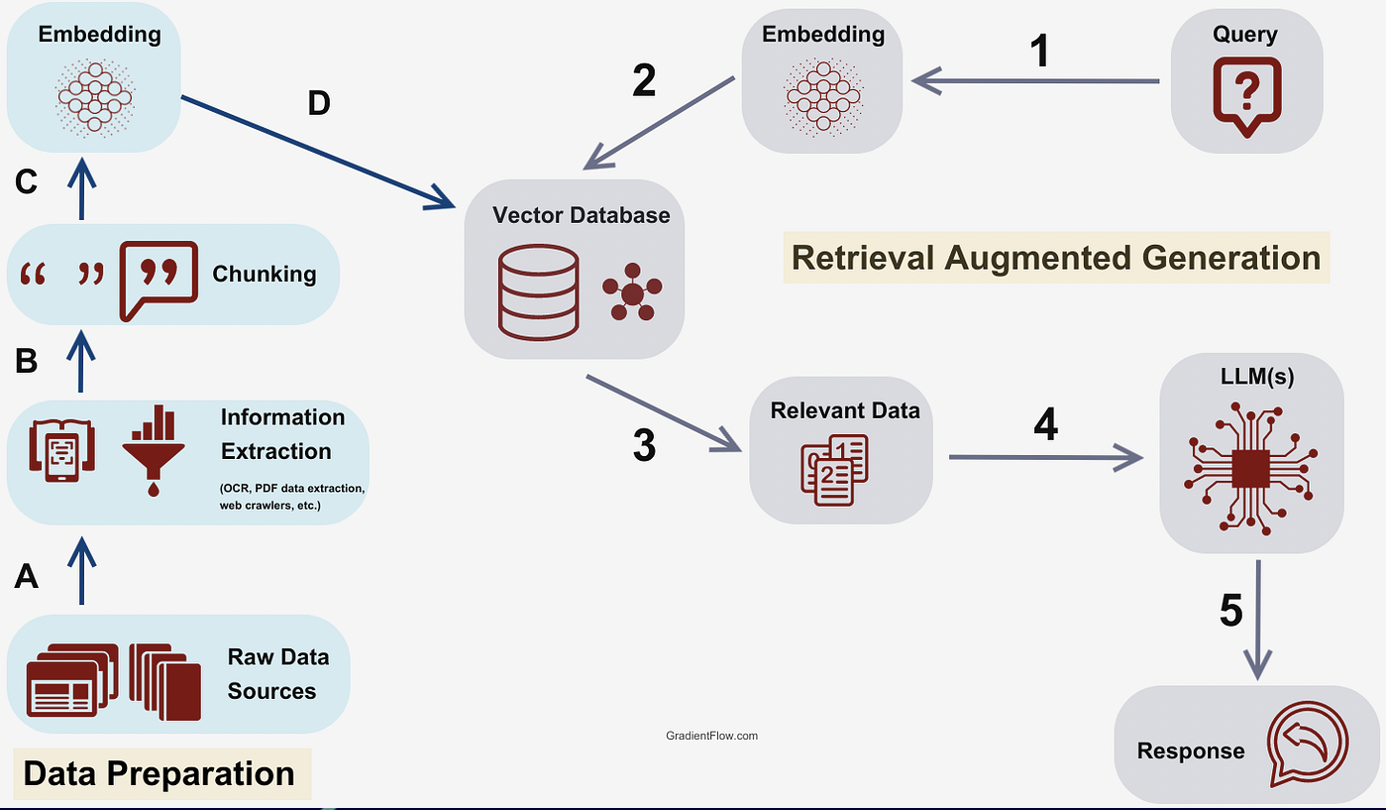
  1. Load various types of data sources
  2. Split data into manageable chunks
  3. Convert chunks into embeddings (vectors)
  4. Store embeddings in a vector database
  5. Retrieve relevant chunks based on user queries
  6. Provide retrieved context to the LLM for enhanced responses
RAG Pipeline
RAG pipeline: from data ingestion to response generation

Explore each step of the RAG pipeline interactively. Click on the tabs below to understand how data flows from raw documents to intelligent responses.

📄

Step 1: Data Ingestion

Load and parse various data sources into the system

📑 PDF Files
🌐 Web Pages
📊 Databases
📝 Text Files
📋 Raw Text
Example: E-commerce Knowledge Base

"TechMart is an online electronics retailer founded in 2015. We offer a 30-day return policy for all products. Free shipping is available for orders over $50. Our customer support team is available 24/7 via chat, email, or phone. We accept all major credit cards and PayPal..."

# Python - Loading documents with LangChain
from langchain.document_loaders import PyPDFLoader, WebBaseLoader

# Load from PDF
pdf_loader = PyPDFLoader("company_handbook.pdf")
documents = pdf_loader.load()

# Load from web
web_loader = WebBaseLoader("https://docs.company.com")
web_docs = web_loader.load()
✂️

Step 2: Chunking

Split documents into smaller, manageable pieces

Original Document:
"TechMart is an online electronics retailer founded in 2015. | We offer a 30-day return policy for all products. | Free shipping is available for orders over $50. | Our customer support team is available 24/7 via chat, email, or phone."
Chunk 1 "TechMart is an online electronics retailer founded in 2015."
Chunk 2 "We offer a 30-day return policy for all products."
Chunk 3 "Free shipping is available for orders over $50."
Chunk 4 "Our customer support team is available 24/7 via chat, email, or phone."
# Chunking with overlap for context preservation
from langchain.text_splitter import RecursiveCharacterTextSplitter

splitter = RecursiveCharacterTextSplitter(
    chunk_size=500,        # Max characters per chunk
    chunk_overlap=50,      # Overlap between chunks
    separators=["\n\n", "\n", ".", " "]
)
chunks = splitter.split_documents(documents)
🔢

Step 3: Embedding Generation

Convert text chunks into numerical vectors

Chunk 1: "TechMart is an online..."
0.234 -0.821 0.156 0.543 ...
Chunk 2: "We offer a 30-day..."
0.891 0.234 -0.567 0.123 ...
Chunk 3: "Free shipping is..."
-0.432 0.765 0.321 -0.198 ...
How Embeddings Work

Each text chunk is converted to a vector of 1536 dimensions (for OpenAI's text-embedding-ada-002) or 384-768 dimensions for smaller models. These vectors capture the semantic meaning of the text - similar concepts have similar vectors!

# Generate embeddings with OpenAI
from langchain.embeddings import OpenAIEmbeddings

embeddings = OpenAIEmbeddings(model="text-embedding-ada-002")

# Each chunk becomes a 1536-dimensional vector
vectors = embeddings.embed_documents([chunk.page_content for chunk in chunks])
print(len(vectors[0]))  # Output: 1536
🗄️

Step 4: Vector Database Storage

Store embeddings for fast similarity search

🔢 Vectors
🗄️ Vector Database
FAISS / Pinecone / Chroma
Fast Search
Popular Vector Databases
FAISS
Open-source, Local
Pinecone
Managed, Cloud
Chroma
Lightweight
Qdrant
High-performance
# Store in FAISS (local) or Pinecone (cloud)
from langchain.vectorstores import FAISS

# Create vector store from documents
vectorstore = FAISS.from_documents(
    documents=chunks,
    embedding=embeddings
)

# Save to disk for persistence
vectorstore.save_local("company_knowledge_index")

Step 5: Query Processing

User asks a question - convert to embedding

👤 User Query
🔢 Query Embedding
🔍 Search
User Question
"What is the return policy at TechMart?"
Query Vector
"What is return policy..."
-0.321 0.654 0.198 -0.432 ...
# Process user query
user_query = "What is the return policy at TechMart?"

# Convert query to embedding (same model as documents!)
query_embedding = embeddings.embed_query(user_query)

# Ready for similarity search
print(len(query_embedding))  # Output: 1536
🔍

Step 6: Similarity Search & Retrieval

Find the most relevant chunks using cosine similarity

Similarity Scores (Cosine Distance):

Chunk 2 "We offer a 30-day return policy for all products..."
0.95
Chunk 1 "TechMart is an online electronics retailer..."
0.72
Chunk 4 "Our customer support team is available 24/7..."
0.45
Chunk 3 "Free shipping is available for orders over $50..."
0.38
Top Retrieved Chunks (k=2)

1. "We offer a 30-day return policy for all products."
2. "TechMart is an online electronics retailer founded in 2015."

# Retrieve most similar chunks
relevant_docs = vectorstore.similarity_search_with_score(
    query=user_query,
    k=3  # Return top 3 matches
)

for doc, score in relevant_docs:
    print(f"Score: {score:.2f} - {doc.page_content[:50]}...")
🤖

Step 7: LLM Response Generation

Combine context with query and generate answer

Augmented Prompt sent to LLM
Context:
- We offer a 30-day return policy for all products.
- TechMart is an online electronics retailer founded in 2015.

Question: What is the return policy at TechMart?

Instructions: Answer based only on the provided context. If you don't know, say so.
🤖 LLM Response
Based on the provided information, TechMart offers a 30-day return policy for all products. This means you can return any item within 30 days of purchase for a full refund or exchange.
# Generate response with context
from langchain.chains import RetrievalQA
from langchain.llms import OpenAI

qa_chain = RetrievalQA.from_chain_type(
    llm=OpenAI(temperature=0),
    chain_type="stuff",
    retriever=vectorstore.as_retriever(k=3)
)

response = qa_chain.run(user_query)
print(response)
# "TechMart offers a 30-day return policy for all products."
Why RAG Works

Without RAG, the LLM might hallucinate or give outdated information. With RAG, the response is grounded in your actual data, making it accurate, traceable, and up-to-date!

LangChain

Framework for Building LLM Applications

LangChain is an open-source framework designed to simplify the development of applications powered by large language models (LLMs). It provides a standardized interface for building complex AI workflows, chains, and agents.

LangChain enables developers to create sophisticated applications by connecting LLMs with external data sources, APIs, and tools. It abstracts away the complexity of managing prompts, memory, and data retrieval, allowing you to focus on building innovative solutions.

Core Components

  • Models: Integration with various LLM providers (OpenAI, Anthropic, HuggingFace, etc.)
  • Prompts: Templates and prompt engineering utilities for consistent interactions
  • Chains: Sequences of calls to LLMs or other utilities for complex workflows
  • Agents: Systems that use LLMs to decide which actions to take and in what order
  • Memory: Mechanisms to persist state between chain or agent calls
  • Indexes: Ways to structure documents for optimal LLM interaction
  • Retrievers: Interfaces for fetching relevant documents for a given query

LangChain Architecture - How It Works

Watch how data flows through LangChain components, from user input to final output.
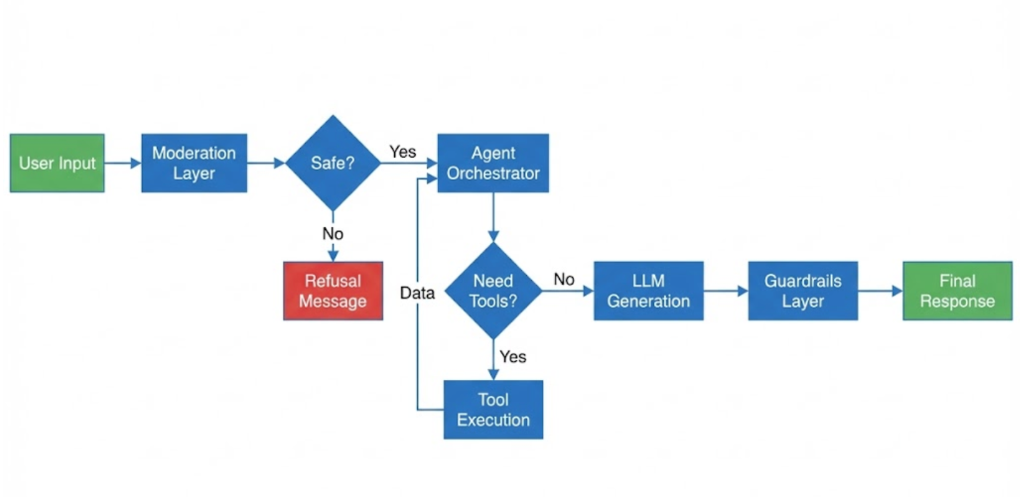
LangChain Flow

Detailed LangChain Execution Flow

Deep Dive: Component Details

Click through each tab to learn more about individual LangChain components.

🏗️

LangChain Architecture Overview

A modular framework for building LLM-powered applications

📄
Input
📝
Prompt
🧠
LLM
⚙️
Chain
Output
🧠
Models
LLMs & Chat Models
📝
Prompts
Templates & Examples
🔗
Chains
Workflows & Pipelines
💾
Memory
State & Context
🤖
Agents
Autonomous Actions
🔧
Tools
External Capabilities
Why LangChain?

LangChain provides pre-built components that can be easily combined to create sophisticated AI applications. Instead of writing boilerplate code, you can focus on your application's unique logic.

🧠

Language Models (LLMs)

The brain of your application - interfaces to AI models

💬
Your Code
🔌
LangChain
🌐
OpenAI
🌐
Anthropic
🌐
Local
# Using different LLM providers with the same interface
from langchain.llms import OpenAI
from langchain.chat_models import ChatAnthropic

# OpenAI model
openai_llm = OpenAI(model="gpt-3.5-turbo", temperature=0.7)

# Anthropic model - same interface!
claude_llm = ChatAnthropic(model="claude-3-sonnet")

# Both work the same way
response = openai_llm.invoke("Explain quantum computing")
Key Benefit

Provider Agnostic: Switch between OpenAI, Anthropic, Cohere, or local models without changing your application code. LangChain provides a unified interface.

📝

Prompt Templates

Structured templates for consistent LLM interactions

📋
Template
+
📊
Variables
=
Final Prompt
from langchain.prompts import PromptTemplate, ChatPromptTemplate

# Simple template with variables
template = PromptTemplate(
    input_variables=["product", "language"],
    template="""Write a compelling product description for {product}.
The description should be in {language} and highlight key benefits."""
)

# Fill in the variables
prompt = template.format(
    product="wireless headphones",
    language="English"
)

# Chat-style templates
chat_template = ChatPromptTemplate.from_messages([
    ("system", "You are a helpful assistant specialized in {domain}."),
    ("human", "{question}")
])
Example Output
"Write a compelling product description for wireless headphones. The description should be in English and highlight key benefits."
🔗

Chains

Combine components into reusable workflows

1
📝 Prompt Template
Format user input with instructions
2
🧠 Language Model
Process the prompt and generate response
3
📤 Output Parser
Structure the output (JSON, list, etc.)
from langchain.chains import LLMChain
from langchain.prompts import PromptTemplate
from langchain.llms import OpenAI

# Create a simple chain
llm = OpenAI(temperature=0.7)
prompt = PromptTemplate(
    input_variables=["topic"],
    template="Write 3 creative ideas about {topic}"
)

# Combine into a chain
chain = LLMChain(llm=llm, prompt=prompt)

# Run the chain
result = chain.run(topic="sustainable energy")
Chain Types
LLMChain SequentialChain RouterChain RetrievalQA
💾

Memory

Maintain conversation context and state

👤
User
💬
Chat
💾
Memory
🧠
LLM
from langchain.memory import ConversationBufferMemory
from langchain.chains import ConversationChain

# Create memory to store conversation history
memory = ConversationBufferMemory()

# Create a conversation chain with memory
conversation = ConversationChain(
    llm=llm,
    memory=memory,
    verbose=True
)

# The chain remembers previous messages!
conversation.run("Hi, my name is Alice")
conversation.run("What's my name?")  # It remembers: "Alice"
📚
Buffer
Store all history
📋
Summary
Summarize over time
🪟
Window
Keep last N messages
🗃️
Vector
Semantic search
🤖

Agents

Autonomous systems that decide which tools to use

Query
🤖
Agent
🔍
Search
🧮
Calculator
🗄️
Database
from langchain.agents import initialize_agent, Tool
from langchain.tools import DuckDuckGoSearchRun

# Define tools the agent can use
search = DuckDuckGoSearchRun()
tools = [
    Tool(name="Search", func=search.run,
         description="Search the web for current information")
]

# Create an agent that decides which tools to use
agent = initialize_agent(
    tools=tools,
    llm=llm,
    agent="zero-shot-react-description",
    verbose=True
)

# The agent autonomously decides to use Search
agent.run("What's the weather in New York today?")
Agent Loop: Thought → Action → Observation
Thought: I need to search for current weather data.
Action: Search["weather New York today"]
Observation: Current temperature is 72°F, partly cloudy...
Final Answer: The weather in New York today is 72°F and partly cloudy.

Key Use Cases

  • Question Answering: Build systems that answer questions over your documents using RAG
  • Chatbots: Create conversational agents with memory and context awareness
  • Data Analysis: Enable LLMs to interact with databases and perform data operations
  • Summarization: Process and summarize large volumes of text efficiently
  • Code Generation: Generate and execute code based on natural language instructions
  • Multi-step Reasoning: Chain multiple LLM calls for complex problem-solving

What is LangChain?

LangChain is an open-source framework designed to simplify the development of applications powered by large language models (LLMs). It provides a standard interface for chains, lots of integrations with other tools, and end-to-end chains for common applications.

  • Data Awareness: Connect a language model to other sources of data
  • Agentic: Allow a language model to interact with its environment

Why Use LangChain?

LangChain accelerates development by providing pre-built components and patterns for common LLM application scenarios. It offers:

  • 🔌 Modularity: Mix and match components to build custom solutions
  • 🔄 Flexibility: Switch between different LLM providers without code changes
  • 📚 Rich Ecosystem: Extensive library of integrations and tools
  • 🛠️ Production-Ready: Built-in error handling, logging, and monitoring
  • 🚀 Rapid Prototyping: Quickly test and iterate on AI application ideas

LangChain Core Components

  • LLMs: Interface to language models (OpenAI, Anthropic, local models)
  • Prompts: Templates for structuring inputs to LLMs
  • Chains: Combine multiple components into workflows
  • Agents: Use LLMs to decide which tools to use
  • Memory: Persist state between chain/agent runs
  • Callbacks: Hook into various stages of execution

Chain Types

  • LLMChain: Simple prompt + LLM combination
  • Sequential Chain: Run multiple chains in sequence
  • Router Chain: Dynamically select which chain to run
  • Transform Chain: Modify data between chain steps
  • Retrieval QA: Question answering over documents

Agent Types

  • Zero-shot ReAct: Reason and act without examples
  • Conversational: Maintain conversation history
  • OpenAI Functions: Use function calling API
  • Structured Chat: Handle complex tool inputs

Memory Types

  • Buffer Memory: Store all conversation history
  • Summary Memory: Summarize conversation over time
  • Token Buffer: Keep last N tokens
  • Entity Memory: Track entities mentioned in conversation
  • Vector Store Memory: Store and retrieve relevant memories

Integration Ecosystem

LangChain integrates with 100+ tools and services:

  • LLM Providers: OpenAI, Anthropic, Cohere, HuggingFace
  • Vector Stores: Pinecone, Weaviate, Chroma, FAISS
  • Document Loaders: PDF, CSV, HTML, APIs
  • Tools: Search engines, calculators, APIs, databases

LangGraph

What is LangGraph?

LangGraph is a library for building stateful, multi-actor applications with LLMs. It extends LangChain to support cyclic flows, allowing for more complex agentic behaviors.

Key Difference: While LangChain uses linear chains (A → B → C), LangGraph enables cycles and conditionals (A → B → C → back to A if needed).
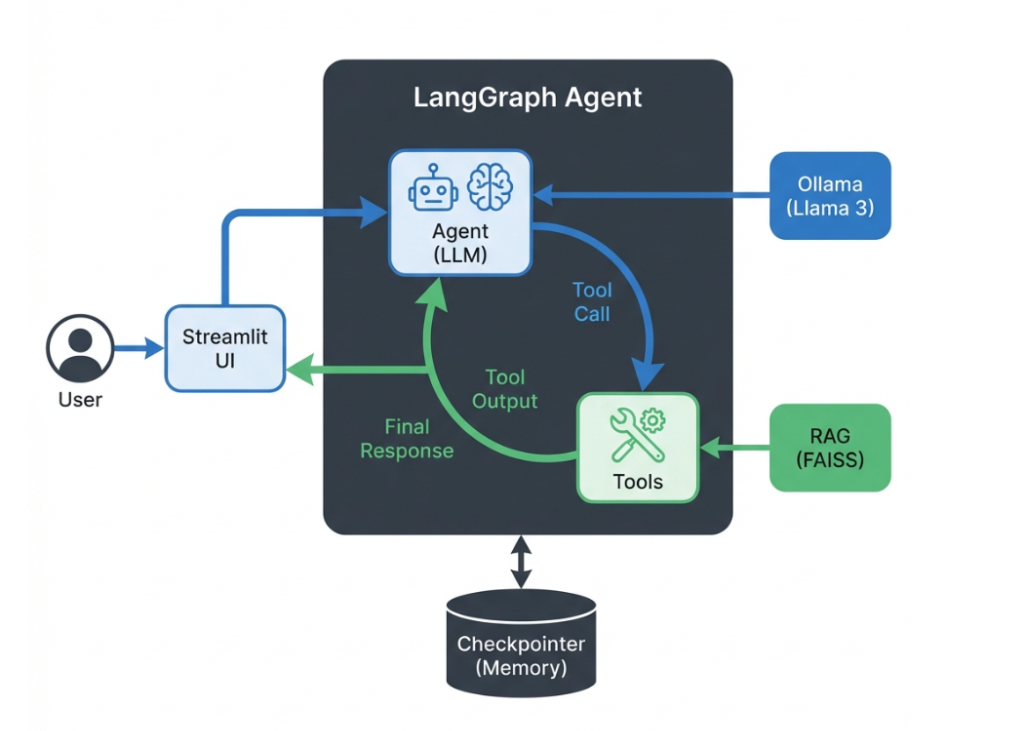
LangGraph Architecture

Conceptual View: How the pieces fit together

Core Concepts

  • Nodes: Functions or agents that process data and make decisions
  • Edges: Connections between nodes (can be conditional)
  • State: Shared memory that persists across the graph execution
  • Checkpoints: Save and resume graph execution at any point

Cyclic Supervisor Pattern

The most powerful pattern in LangGraph is the Cyclic Supervisor, where a supervisor agent orchestrates multiple worker agents in a loop until the task is complete.

User → Supervisor → [Agent A | Agent B | Agent C] → Supervisor → ... → Final Response

Why Use LangGraph?

  • State Management: Built-in persistence for complex, multi-turn conversations
  • Cycles & Loops: Support for iterative refinement and self-correction
  • Conditional Logic: Route between different agents based on context
  • Human-in-the-Loop: Checkpoint system for approval workflows
  • Scalability: Coordinate multiple specialized agents efficiently

Key Use Cases

✅ Multi-step reasoning
Complex tasks requiring iteration
✅ Research Agents
Search, analyze, synthesize information
✅ Customer Support
Coordinating specialized agents
✅ Code Generation
Write, test, fix in loops

LangChain vs. LangGraph

While LangChain excels at building linear, directed acyclic graphs (DAGs) for straightforward applications, LangGraph introduces the ability to build stateful, cyclic graphs which are essential for complex agentic workflows.
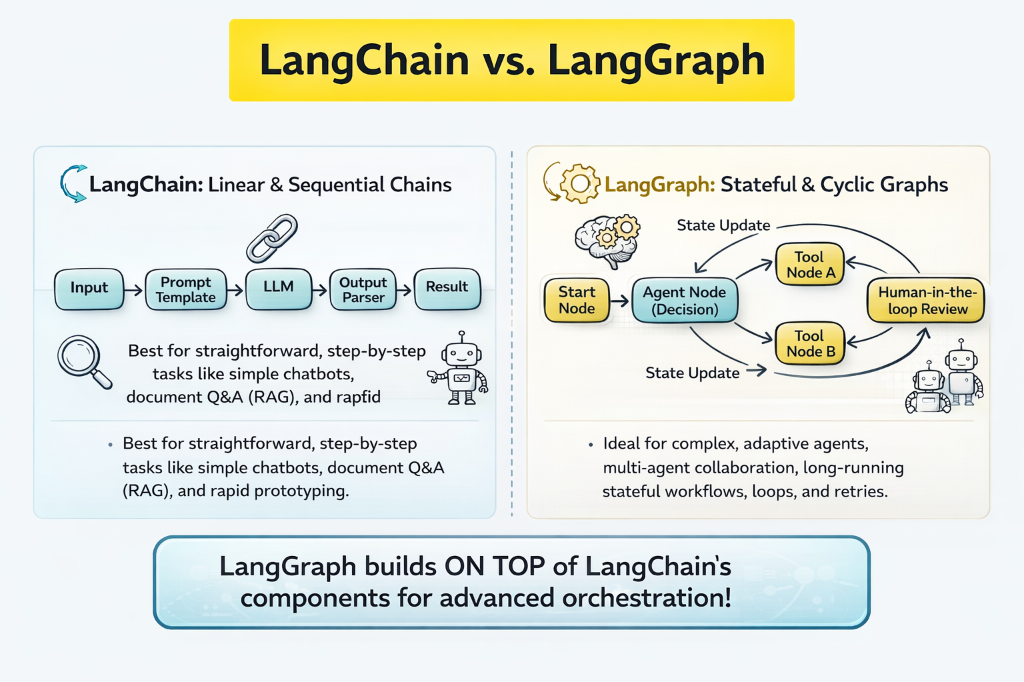
LangChain vs. LangGraph Architecture
Comparative architecture: Linear Chains vs. Cyclic Graphs

Guardrails

What are Guardrails?

Guardrails are safety mechanisms that control and validate AI model inputs and outputs, ensuring responses are safe, accurate, and aligned with business requirements.

Purpose: Prevent harmful content, enforce policies, validate outputs, and maintain quality standards.

Types of Guardrails

  • Input Guardrails: Filter/validate user prompts before processing
  • Output Guardrails: Validate and sanitize model responses
  • Content Moderation: Block harmful, toxic, or inappropriate content
  • PII Detection: Identify and mask personal information
  • Topic Restriction: Keep responses within allowed domains

Implementation Best Practices

  • Layer multiple guardrails for defense-in-depth
  • Log and monitor all guardrail triggers
  • Regularly update rules based on new attack patterns
  • Balance safety with user experience
  • Use both rule-based and ML-based guardrails

Hallucinations & Mitigation

What are Hallucinations?

Hallucinations occur when LLMs generate plausible but factually incorrect information. This is one of the biggest challenges in production AI systems.

Impact: Can lead to misinformation, legal issues, and loss of user trust.

Why Hallucinations Happen

  • Training Data Gaps: Model lacks information on specific topics
  • Over-confidence: Model generates text even when uncertain
  • Pattern Matching: Predicts likely tokens without factual verification
  • Context Confusion: Misinterprets or conflates information
  • Knowledge Cutoff: No access to recent information

Mitigation Strategies

🔍 RAG (Retrieval)
Ground responses in verified documents
✅ Fact Checking
Validate outputs against knowledge base
🎯 Prompt Engineering
Instruct model to admit uncertainty
🔄 Self-Consistency
Generate multiple responses and compare

Detection Techniques

  • Citation Verification: Check if sources actually support claims
  • Confidence Scoring: Monitor model uncertainty signals
  • Cross-Reference: Validate against multiple knowledge sources
  • Human Review: Critical outputs reviewed by domain experts

Model Context Protocol (MCP)

What is MCP?

The Model Context Protocol (MCP) is an open standard developed by Anthropic that enables AI applications to securely connect to external data sources and tools. It provides a universal, standardized way for LLMs to interact with various systems, databases, APIs, and services.

MCP acts as a bridge between AI models and the external world, allowing them to access real-time information, execute actions, and integrate with existing enterprise systems without custom integrations for each tool or data source.

Key Features

  • Standardized Interface: Single protocol for connecting to multiple data sources and tools
  • Security First: Built-in authentication and permission controls for safe data access
  • Vendor Agnostic: Works across different LLM providers and platforms
  • Bidirectional Communication: Models can both retrieve data and execute actions
  • Context Management: Efficiently manages and maintains context across interactions
  • Extensible: Easy to add new tools and data sources without modifying core code

Why Use MCP?

MCP solves a critical challenge in AI development: the fragmentation of tool integrations. Instead of building custom connectors for each combination of AI model and data source, MCP provides a unified approach.

  • 🔌 Plug-and-Play Integration: Connect new tools and data sources with minimal code
  • 🔒 Enterprise-Grade Security: Controlled access to sensitive data and systems
  • Reduced Development Time: No need to build custom integrations for each tool
  • 🔄 Interoperability: Switch between different AI models without rewriting integrations
  • 📈 Scalability: Easily scale to hundreds of tools and data sources
  • 🛡️ Reliability: Standardized error handling and connection management

MCP Architecture Overview

The Model Context Protocol follows a client-server architecture where an MCP host (an AI application like Claude Desktop) establishes connections to one or more MCP servers. The MCP host creates one MCP client for each MCP server, maintaining dedicated one-to-one connections.
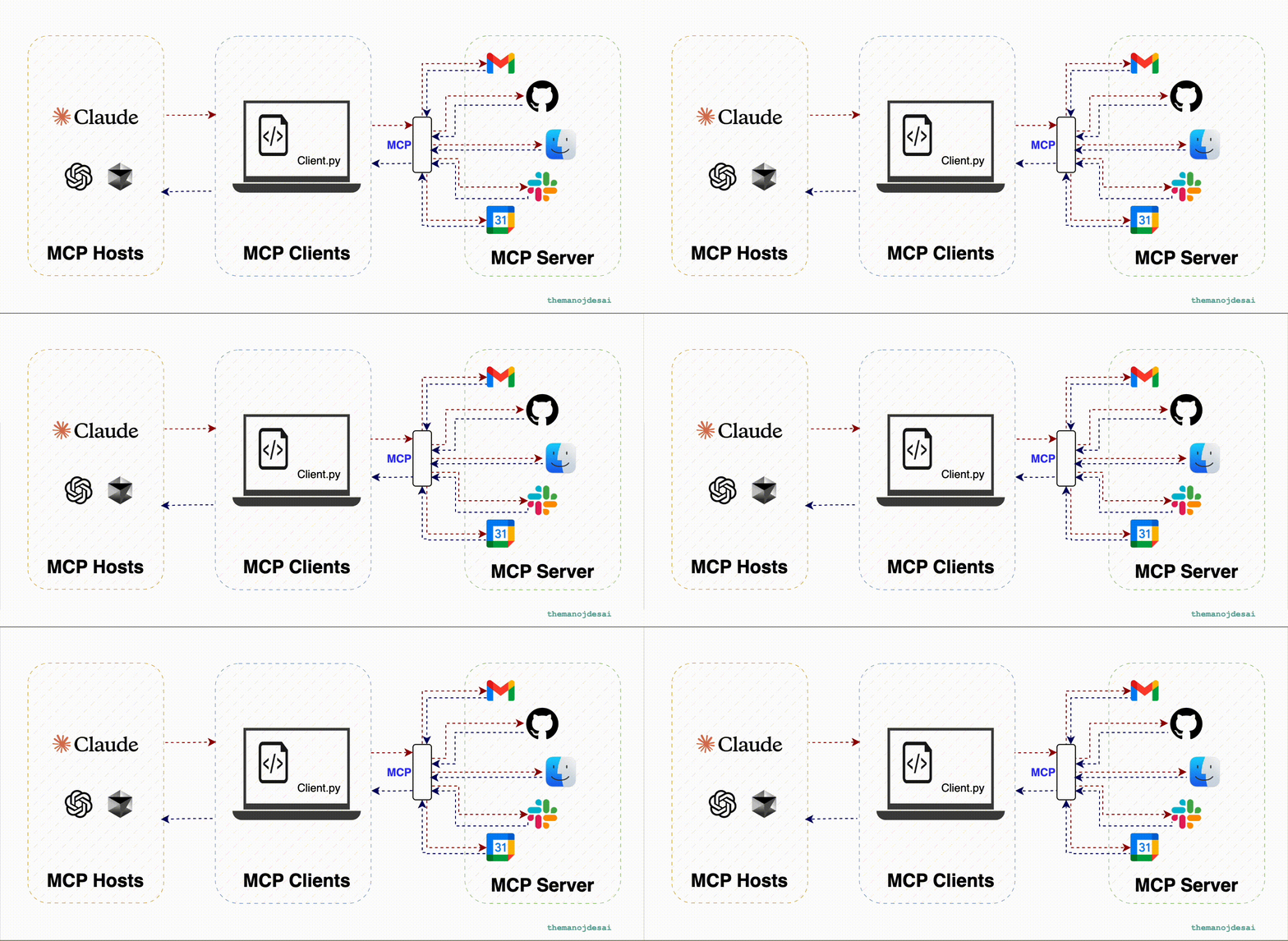
Model Context Protocol Architecture
MCP architecture showing the relationship between hosts, clients, and servers

Key Participants

  • MCP Host: The AI application that coordinates and manages multiple MCP clients
  • MCP Client: Maintains a connection to an MCP server and obtains context for the host
  • MCP Server: A program that provides context to MCP clients

Before and After MCP

MCP eliminates the need for custom integrations between each AI model and data source. Instead of building separate connectors for every combination, MCP provides a standardized protocol that works universally across different systems.
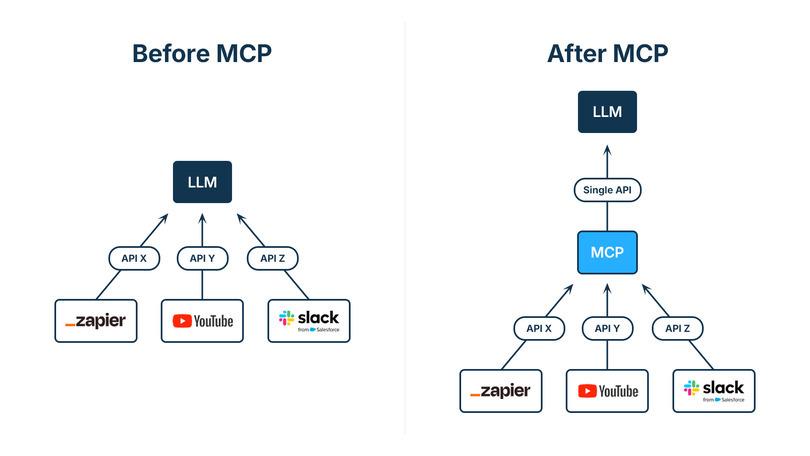
MCP Before and After Comparison
Comparison showing how MCP simplifies integrations: Before (left) - multiple custom connections required; After (right) - single standardized protocol for all connections

MCP Scope: The protocol focuses solely on context exchange between AI applications and data sources. It includes the MCP specification, SDKs for different programming languages, development tools like the MCP Inspector, and reference server implementations.

Common Use Cases

  • Database Access: Query SQL databases, NoSQL stores, and data warehouses
  • API Integration: Connect to REST APIs, GraphQL endpoints, and web services
  • File Systems: Read and write files from local or cloud storage
  • Business Tools: Integrate with CRM, ERP, and productivity platforms
  • Real-time Data: Access live data feeds, monitoring systems, and IoT devices
  • Code Execution: Run scripts and interact with development environments

MCP Architecture Components

  • MCP Host: The AI application (e.g., Claude Desktop, VS Code)
  • MCP Client: Manages connection to a specific server
  • MCP Server: Provides tools and resources to clients
  • Transport Layer: Communication via stdio, HTTP, or WebSocket

MCP Features

  • Tools: Functions that can be called by the AI
  • Resources: Data sources that can be read
  • Prompts: Reusable prompt templates
  • Sampling: Request LLM completions from the client

Building MCP Servers

Steps to create an MCP server:

  1. Choose a language (Python, TypeScript, etc.)
  2. Install MCP SDK (pip install mcp or npm install @modelcontextprotocol/sdk)
  3. Define tools with clear descriptions
  4. Implement tool handlers
  5. Configure transport (stdio recommended for local)
  6. Test with MCP Inspector

MCP vs Other Frameworks

  • vs LangChain: MCP is a protocol, LangChain is a framework
  • vs Function Calling: MCP standardizes across providers
  • vs Plugins: MCP is vendor-neutral and interoperable

Real-world MCP Servers

  • Filesystem: Read/write local files
  • Database: Query SQL databases
  • GitHub: Interact with repositories
  • Slack: Send messages, read channels
  • Google Drive: Access documents
  • Custom APIs: Wrap any API as MCP tools

Security Considerations

  • Authentication: Implement proper auth for sensitive operations
  • Authorization: Control what tools can access
  • Input Validation: Sanitize all tool inputs
  • Rate Limiting: Prevent abuse of expensive operations
  • Audit Logging: Track all tool invocations

GenAI Agents

Evolution Beyond LLMs

GenAI agents represent an evolution in artificial intelligence, moving beyond simple language models to systems capable of complex reasoning, memory management, and autonomous task execution.

Agents combine multiple components, such as access to external tools, short-term and long-term memory, document processing, and even multi-modal capabilities (combining text, images, and other data types).
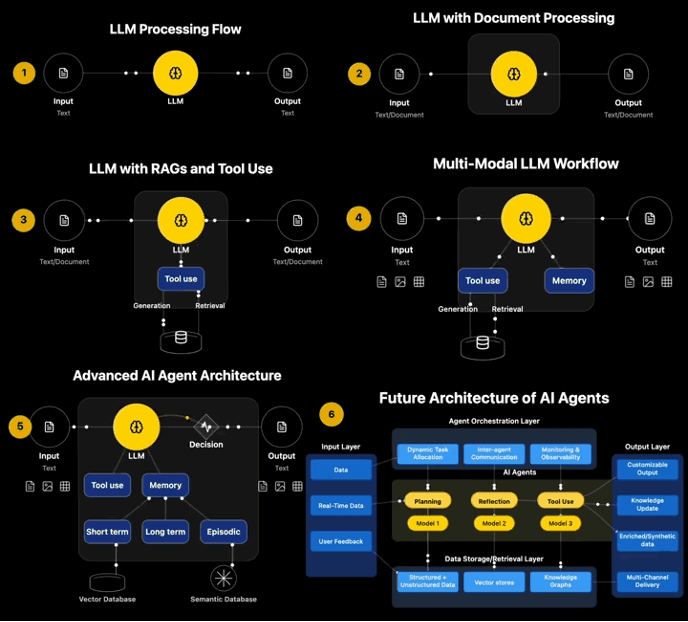
Agent Capabilities

  • Access to external tools (APIs, databases, company systems)
  • Short-term and long-term memory management
  • Document processing and knowledge retrieval
  • Multi-modal capabilities (text, images, structured data)
  • Complex reasoning and decision-making
  • Autonomous task execution and planning
Agents in Action
GenAI agents orchestrating tools, memory, and execution flow

Agent Architectures

  • ReAct (Reason + Act): Alternate between reasoning and action
  • Plan-and-Execute: Create a plan, then execute steps
  • Reflexion: Learn from mistakes and self-improve
  • Multi-Agent: Multiple agents collaborate on tasks

Agent Components

  • LLM Brain: The reasoning engine
  • Tools: Functions the agent can call
  • Memory: Short-term and long-term storage
  • Planning: Breaking down complex tasks
  • Reflection: Evaluating and improving actions

Common Agent Tools

  • Search: Web search, document search
  • Calculator: Mathematical operations
  • Code Execution: Run Python, JavaScript, etc.
  • API Calls: Interact with external services
  • Database Queries: Fetch and update data
  • File Operations: Read, write, modify files

Agent Frameworks

  • LangChain Agents: Part of LangChain ecosystem
  • AutoGPT: Autonomous goal-oriented agent
  • BabyAGI: Task-driven autonomous agent
  • CrewAI: Multi-agent collaboration framework
  • Semantic Kernel: Microsoft's agent framework

Challenges

  • Reliability: Agents can make mistakes or get stuck
  • Cost: Multiple LLM calls can be expensive
  • Latency: Sequential reasoning takes time
  • Safety: Autonomous actions need guardrails
  • Evaluation: Hard to measure agent performance

Best Practices

  • Clear Tool Descriptions: Help the agent choose correctly
  • Limit Iterations: Prevent infinite loops
  • Implement Fallbacks: Handle errors gracefully
  • Monitor Costs: Track token usage
  • Human-in-the-Loop: Require approval for critical actions

Learning Resources

📚 Courses - AI Agents and Agentic Architecture

Practical courses from DeepLearning.AI on building, optimizing, and coordinating intelligent agents.

Course Platform Focus
Practical Multi AI Agents and Advanced Use Cases with CrewAI DeepLearning.AI Building and coordinating multiple agents
AI Agents in LangGraph DeepLearning.AI Architecture and execution with LangGraph
Long-Term Agentic Memory with LangGraph DeepLearning.AI Long-term memory in agents
AI Agentic Design Patterns with AutoGen DeepLearning.AI Design patterns and coordination
Evaluating AI Agents DeepLearning.AI Agent performance evaluation
Event-Driven Agentic Document Workflows (LlamaIndex) DeepLearning.AI Document workflows with RAG + agents
Build Apps with Windsurf's AI Coding Agents DeepLearning.AI Code generation agents
Building Code Agents with Hugging Face (SmolAgents) DeepLearning.AI Code and automation agents
Building AI Browser Agents DeepLearning.AI Interactive browser-based agents
DsPy: Build and Optimize Agentic Apps DeepLearning.AI Python framework for agentic optimization
MCP: Build Rich-Context AI Apps with Anthropic DeepLearning.AI Building rich-context AI applications

📄 Articles & Reports - GenAI Strategy and Leadership

Industry insights from leading consulting firms on GenAI strategy, ROI, and organizational transformation.

Report Organization Type Focus
Unlocking the Right Agentic AI Use Cases Deloitte LinkedIn Choosing the right Agentic AI use cases
Identifying and Scaling AI Use Cases OpenAI PDF Scaling high-impact AI use cases
Seizing Agentic AI Advantage McKinsey Article Turning productivity into ROI
Agentic AI Advantage — Unlocking Next-Level Value KPMG PDF Strategic value for executives
How to Become an Agentic Organization McKinsey Article Organizational strategies for Agentic AI
One Agent to Rule Them All PwC PDF From data foundations to Agentic enterprises
The ROI of AI in 2025 Google PDF Financial impact and AI ROI
One Year of Agentic AI — Six Lessons McKinsey Article Lessons from one year of Agentic AI adoption

📖 Transformers & Attention Mechanisms - Deep Dive

Essential resources to understand the technology behind modern LLMs.

Resource Type Source Focus
Visualizing Transformers and Attention Video 3Blue1Brown - TNG Big Tech Day '24 Visual explanation of transformers
Transformers, the Tech Behind LLMs Video 3Blue1Brown - Deep Learning Chapter 5 How transformers work
Attention in Transformers, Step-by-Step Video 3Blue1Brown - Deep Learning Chapter 6 Attention mechanism explained
How Might LLMs Store Facts Video 3Blue1Brown - Deep Learning Chapter 7 Knowledge representation in LLMs
A Survey of Transformers Paper arXiv Comprehensive transformer survey
Attention Is All You Need Paper NeurIPS 2017 Original transformer paper (Vaswani et al.)

GenAI Quiz

Test Your Knowledge

Ready to test what you've learned? Take the full interactive quiz to assess your understanding of GenAI concepts.

Open Full Quiz ↗

Hands-on Workshops

🚀 Practical GenAI Implementation

Put your knowledge into practice with our comprehensive hands-on workshops. We have divided the practical sessions into three focused tracks to cater to different learning goals.

🤖 Workshop 1: ChatBot Basics (Files 1-5)

Start here to understand the fundamental building blocks of Generative AI. You will work with individual Python scripts to learn how chatbots, tools, and RAG systems work under the hood.

What You'll Learn:

  • Docker Basics: Containerization and deployment fundamentals
  • Local LLMs: Running Ollama models (Llama 3.2, Mistral) locally
  • LangChain Fundamentals: Chains, prompts, and conversation memory
  • Tools & Agents: Function calling and tool integration
  • RAG Basics: FAISS vector databases and semantic search
  • Python Development: Building AI applications from scratch

Technologies: Python, Docker, Ollama, LangChain, FAISS, Sentence Transformers

Start ChatBot Basics Workshop ↗

✨ Workshop 2: Production App (Full Agent + Streamlit)

Ready for the next level? Deploy a complete, production-ready AI assistant with a polished user interface. This workshop focuses on application architecture, dependency management, and user experience.

What You'll Learn:

  • Streamlit Development: Building production-ready web UIs
  • Advanced RAG: PDF processing, context injection, and vector search
  • Agent Architecture: Multi-tool agents with LangChain or LangGraph
  • Moderation & Guardrails: Security and quality layers for production
  • Docker Deployment: Multi-container apps with docker-compose
  • Dependency Management: Poetry for Python package management
  • Project Structure: Organizing production-grade AI applications
🔗 LangChain Version

Classic agent architecture using LangChain's AgentExecutor with tools, memory, and chains.

Stack: LangChain, Ollama, FAISS, Streamlit

Start LangChain Workshop ↗
🔀 LangGraph Version

State machine-based agent with explicit control flow, cycles, and conditional branching.

Stack: LangGraph, Ollama, FAISS, Streamlit

Start LangGraph Workshop ↗